Navigating the Earnings tab

About the Earnings tab
The Earnings tab provides a summary of your earnings activity in the Spark Driver™ app. You can use the Earnings tab to view your earnings information by week, day, or trip and review changes to your earnings breakdown over time.
The Earnings tab includes:
- A weekly earnings overview
- Daily earnings totals for the current week
- Confirmed earnings summaries
- Detailed trip earnings information
- Access to Earnings History reports
Weekly earnings can be viewed in the Earnings overview, which displays your earnings from completed service offers. Trip earnings may vary based on factors such as distance traveled, estimated time, and order size.
Viewing earnings information
To view your earnings information, you can:
- Tap Earnings (iOS) or Menu > Earnings (Android).
- Review the Earnings screen.
From the Earnings screen, you can:
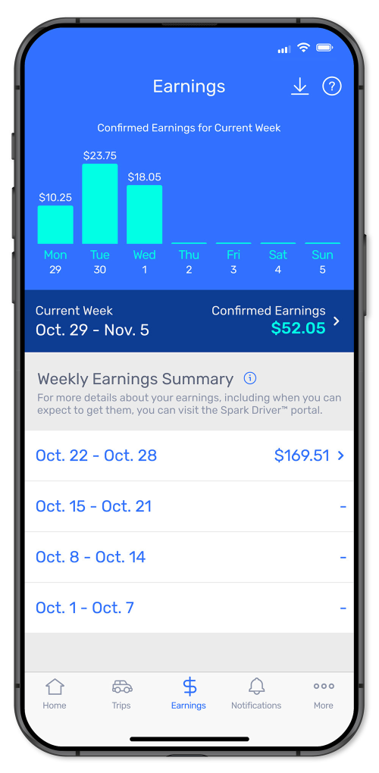
- View earnings amounts for each day of the current week.
- View your current week's earnings summary.
- Select a previous week to view earnings details for that date range.
- Access trip-level earnings information.
The current week section displays earnings activity by day, allowing you to see how earnings are distributed throughout the week.
To learn more about a specific item in your breakdown, you can tap the information icon.
Current week overview
The Earnings screen displays:
- A daily earnings chart for the current week.
- The current week's date range.
- The total confirmed earnings for the selected week.
- A list of previous weeks with available earnings information.
Understanding total confirmed earnings
Confirmed Earnings show the total earnings that have been finalized for the selected week.
To view confirmed earnings details, you can:
- Tap Confirmed Earnings on the Earnings screen.
- Review the earnings summary for the selected week.
From the weekly earnings summary, you can:
- View total confirmed earnings for the week.
- View earnings by day.
- View earnings for individual trips completed during that week.
If updates occur to your earnings breakdown, the Earnings tab reflects those changes.
Viewing trip receipts
Trip receipts provide a detailed breakdown of earnings for a completed trip.
To view trip receipts, you can:
- Tap Earnings (iOS) or Menu > Earnings (Android).
- Tap a week from the earnings history list.
- Choose a day, if applicable.
- Tap a trip to view its receipt.
Trip receipts can help you review earnings details for a specific completed service offer. For more information, you can review Reviewing Trip receipt.
Earnings History reports
Earnings History reports provide a record of your earnings activity for a selected period.
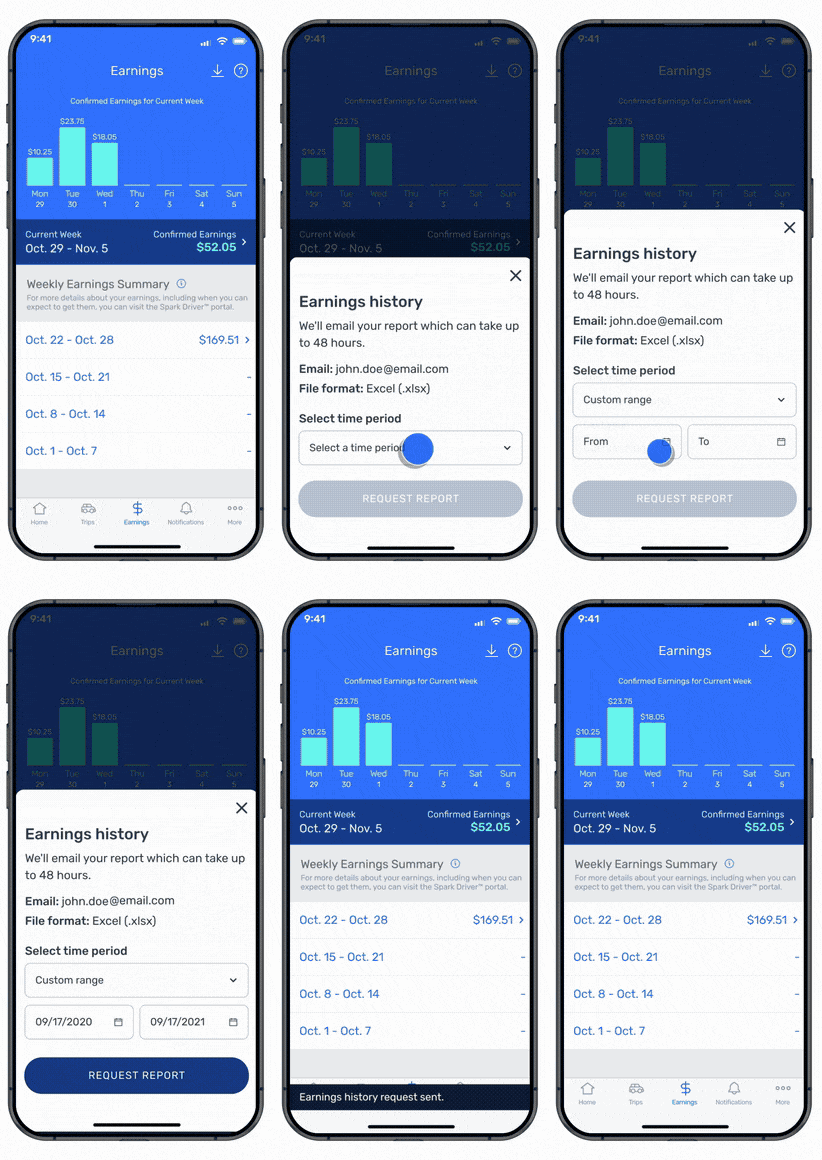
To request an Earnings History report, you can:
- Tap Earnings (iOS) or Menu > Earnings (Android).
- Tap the Request Earnings History icon.
- Follow the prompts to submit your request.
You can use Earnings History reports to review past earnings information.
Need Help?
If you have questions about your earnings, you can contact Driver Support by tapping Help > Chat Now.
