Viewing incentives

About the Incentive Program
You can earn more through the incentive program by completing a certain number of trips within a specific timeframe. More details about incentives are available in the Spark Driver™ app.
Incentives are distinct from:
- Trip earnings
- Tips
- Rewards
Each incentive opportunity has its own eligibility criteria and active dates.
Incentive types
The Spark Driver platform may offer different types of incentive opportunities.
Earn per trip
Per-trip incentives provide an additional earnings amount for each eligible trip completed during an active incentive period.
Example: Earn $5 extra after each eligible trip.
Standard incentives
Standard incentives provide a single incentive amount after meeting all eligibility criteria.
Example: Earn $20 extra after 3 eligible trips.
Tiered incentives
Tiered incentives include multiple incentive levels. As you complete more trips, the total incentive amount increases with each tier.
Example: Earn up to $50 extra after 4-8 eligible trips.
Incentive details show the details of each tier.
Example:
- Earn a total of $20 for completing 4 trips.
- Earn a total of $40 for completing 6 trips.
- Earn a total of $50 for completing 8 trips.
Viewing incentive opportunities
You can view available incentive opportunities through Incentive Programs in the Spark Driver app.
If an offer includes incentives, you may see eligible incentive amounts directly on the offer card.
You may see multiple eligible incentives on a single offer. If an incentive requires multiple eligible trips, the incentive may appear on the offer card for the final eligible trip associated with the incentive opportunity.
To see more incentive details on an offer card, you can tap Trip details to preview the eligible incentive opportunities.
The Incentive Programs screen may include:
- Active incentive opportunities
- Upcoming incentive opportunities
- Progress tracking
- Eligibility criteria
- Incentive details
The opportunities available to you may vary.
To view your eligibility for incentives, you can:
- Tap More (iOS) or Menu (Android).
- Tap Incentive Programs.
The Incentive Programs screen displays available incentives.
You can track your incentive progress in the app as you complete eligible trips.
Active and upcoming incentives
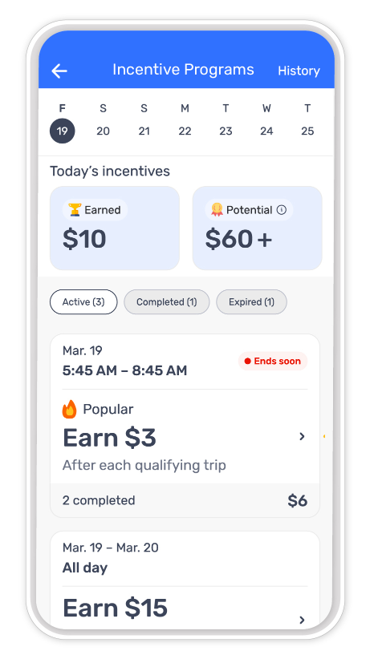
Active incentives
Active incentives are currently available and may count toward an incentive's eligibility criteria when the incentive criteria are met.
Upcoming incentives
Upcoming incentives display incentive opportunities that may become available in the future but are not yet active.
Details displayed for upcoming incentives may change before the incentive becomes active. You can check the Incentive Programs screen for the most up-to-date information.
Incentive details
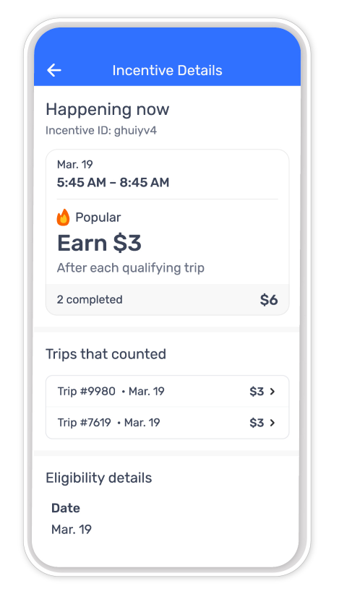
Each incentive opportunity may include information about:
- Eligibility criteria
- Eligible trips
- Active dates
- Incentive earnings
- Progress toward completion
You can review incentive details to determine whether a trip meets the eligibility criteria for a specific opportunity.
Progress tracking
You can track progress toward available incentives through the Incentive Programs.
Progress information may include:
- Trips completed
- Trips remaining
- Eligibility status
- Incentive completion status
Progress updates may take time to process after an eligible trip is completed.
What impacts incentive eligibility?
Eligibility criteria varies by incentive opportunity.
Factors that may affect eligibility include:
- Delivery zone
- Offer type
- Active dates
- Trip completion criteria
- Other opportunity-specific criteria
Each incentive opportunity has its own eligibility criteria and active dates. You can view the incentive details by tapping the specific incentive.
Incentive earnings availability
After your incentives are processed, you can go to the Earnings tab in the Spark Driver app to view an itemized breakdown.
Your primary earnings method determines when completed incentive earnings become available:
OnePay account (set as primary)
Earnings are available instantly after you complete the eligible trips associated with the incentive opportunity or after the incentive period ends.
Other earnings account (set as primary)
Earnings are processed within 24 hours after you complete the eligible trips associated with the incentive opportunity or after the incentive period ends. Incentives processed before Sunday at midnight are sent the following Tuesday by 8 PM Pacific Time.
To see your detailed incentives history, you can:
- Tap More (iOS) or Menu (Android).
- Tap Incentive Programs.
- Tap History.
Need help?
If you have questions about an incentive or your eligibility, you can contact Driver Support by tapping Help > Chat Now.
